Snowflake's COPY Command: The Key to Efficient Data Loading
The power of data loading in Snowflake.
In today's data-driven world, the ability to load large volumes of information efficiently and reliably has become a critical competency for any organization. Within the Snowflake ecosystem, few tools are as fundamental as the COPY command, a powerful functionality that forms the backbone of many data ingestion architectures.
As a data engineer with years of experience implementing enterprise solutions, I've witnessed firsthand how proper use of the COPY command can transform loading processes that previously took hours into operations that complete in minutes, while simultaneously improving data quality and reliability.
What is the COPY Command in Snowflake?
The COPY command in Snowflake is a SQL instruction specifically designed to load data from external files stored in cloud platforms into Snowflake tables. Its primary purpose is to provide an efficient, flexible, and controllable way to move large volumes of data.
Unlike traditional loading methods, COPY leverages Snowflake's distributed architecture to parallelize operations, resulting in exceptional performance even with massive datasets.
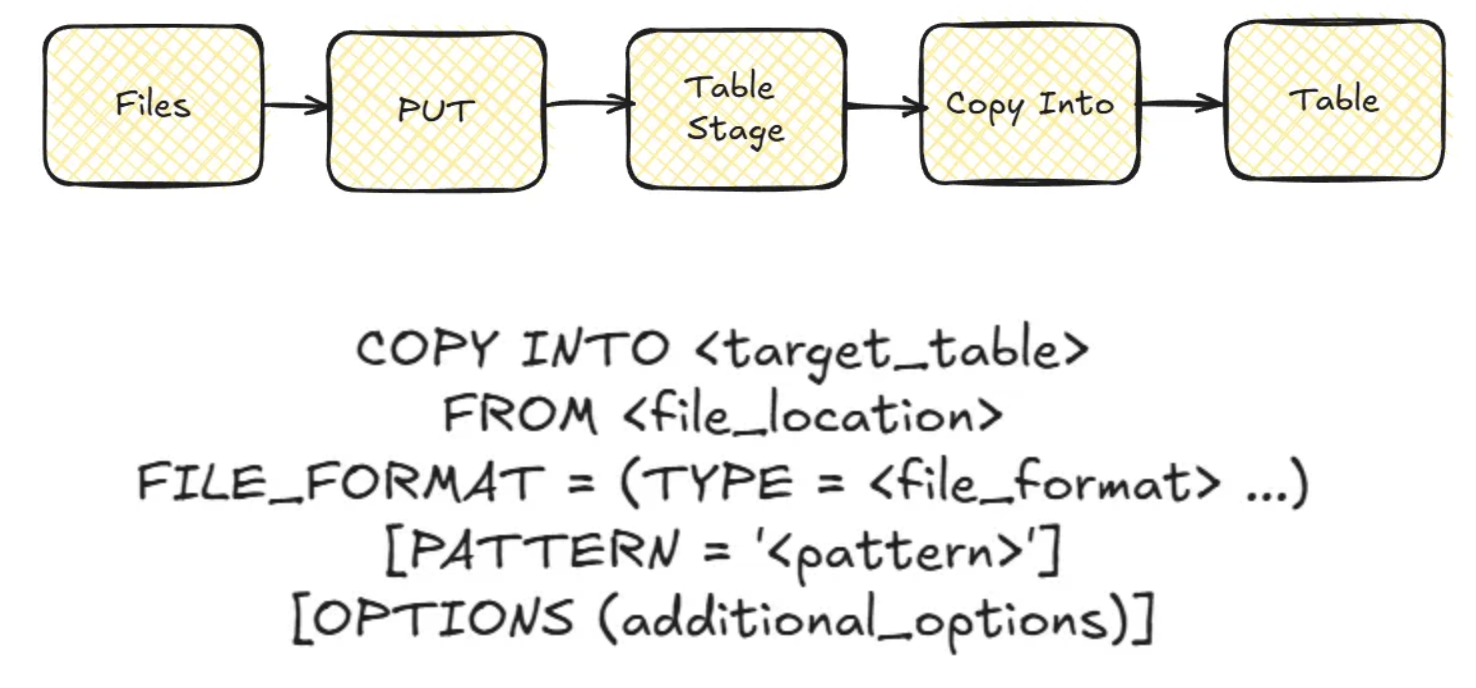
In its basic form, the command follows this structure:
COPY INTO <target_table>
FROM <file_location>
FILE_FORMAT = (TYPE = <file_format> ...)
[PATTERN = '<pattern>']
[OPTIONS (additional_options)]
Main Components of the COPY Command
- 1. Destination (INTO) — Specifies the table or materialized view where data will be loaded. Can be a standard, temporary, transient table, or materialized view.
- 2. Source (FROM) — Defines where the files are stored: Amazon S3, Google Cloud Storage, Microsoft Azure, or Snowflake Stage.
- 3. File Format — Defines how Snowflake should interpret the files. Supported formats: CSV, JSON, AVRO, ORC, PARQUET, XML. Configuration options for delimiters, headers, null values, etc.
- 4. Patterns and Additional Options — Patterns to select file subsets; configurations for error handling, maximum size, automatic purging, etc.
Modes and Variants of the COPY Command
- COPY INTO TABLE (Standard Load) — For loading data from external location to a table.
- COPY INTO LOCATION (Unload) — Allows extracting data from Snowflake to external storage.
- COPY with Transformation — Allows transforming data during loading using a SQL query.
- COPY Validation — For validating data without actually loading it.
Integration with Snowflake Stages and the PUT Command
Stages are designated locations where Snowflake can access data files, acting as intermediaries between external storage and tables.
Types of Stages
- Internal Stages — Storage managed by Snowflake
- External Stages — References to locations in cloud storage
- User Stages — Private to a specific user
- Temporary Stages — Available only during the current session
Relationship between PUT and COPY
PUT uploads files from your local system to a Snowflake stage (file system level). COPY reads data from files already in stages and loads them into tables (data level).
Typical flow from local files:
-- Step 1: Upload local file to an internal stage
PUT file:///C:/data/january_sales.csv @my_internal_stage;

-- Step 2: Load data from the stage into the table
COPY INTO sales_table
FROM @my_internal_stage/january_sales.csv
FILE_FORMAT = (TYPE = 'CSV', SKIP_HEADER = 1);
For files already in cloud storage (S3, Azure, GCP), you typically only need the COPY command with a properly configured external stage.
Loading Strategies for Different Volumes
- Small files (< 100MB) — Consider file consolidation; possibly disable parallelism with
SINGLE = TRUE. - Medium volumes — Leverage default parallelism; use columnar formats (Parquet) for better performance.
- Massive data — Split the load into multiple parallel COPY commands; use larger warehouses; implement progress monitoring.
Error Handling and Validation
The COPY command offers several strategies:
- ABORT_STATEMENT (default) — Stops the entire operation upon any error
- SKIP_FILE — Skips entire files containing errors
- SKIP_FILE_N% — Skips files exceeding a specific percentage of errors
- CONTINUE — Skips individual records with errors
Validation mode tests the load without inserting data:
COPY INTO customers
FROM @customer_stage
VALIDATION_MODE = 'RETURN_ERRORS';
Performance Optimization
Key factors:
- Warehouse size — Larger warehouses provide greater parallelism. Start with Medium (M) and scale as needed.
- File format and size — Columnar formats (Parquet, ORC) are more efficient. Ideal size: 100–250 MB per file.
- Compression — GZIP: good compression, not splittable. SNAPPY: less compression, better parallelism. ZSTD: good balance.
Tips: Consolidate small files before loading; temporarily scale the warehouse for large loads; divide massive loads by logical partitions.
Best Practices
- Pipeline design — Implement multi-stage architecture (raw, staging, curated); establish clear retention policies; design for recovery and re-executability.
- Security — Avoid hardcoded credentials; apply principle of least privilege; audit loading operations.
- Performance — Optimize file format and size; balance resources according to volume; parallelize strategically.
Conclusion
The COPY command is much more than a simple loading tool; it's a strategic component for modern data architectures in Snowflake. Its versatility, performance, and integration capabilities (Snowpipe, Tasks, Streams) make it essential for any serious implementation.
The key to success lies in understanding its capabilities, applying best practices, and adapting it to the specific requirements of your use case.
Need help designing or optimizing your Snowflake data loading? Contact us at team@simov.io.