Snowflake Tasks: The Silent Engine of Automation in Snowflake
Discovering the power of automation in Snowflake.
In the dynamic landscape of modern data engineering, automation has become the fundamental pillar supporting efficient and scalable architectures. Today, I want to dive deeply into one of Snowflake's most powerful yet often underestimated features: Snowflake Tasks.
As a data engineer with years of experience implementing solutions across various industries, I've witnessed firsthand the transformative impact that a well-executed automation strategy can have on data operations. Whether you're a technical leader evaluating technologies or a developer looking to optimize your workflows, this comprehensive guide will provide you with everything you need to know about this essential functionality.
What Exactly Are Snowflake Tasks?
Snowflake Tasks are native components within the Snowflake ecosystem designed to schedule and automate SQL operations. Essentially, they are scheduled jobs that allow you to execute specific SQL commands at predetermined times or in response to the completion of other tasks.
Think of them as tireless workers within your Snowflake environment, diligently performing tasks that would otherwise require manual intervention. Unlike external solutions that might need additional infrastructure, Tasks operate entirely within the Snowflake ecosystem, leveraging its internal architecture and processing capabilities.
Fundamental Features
- Scheduled Execution — From precise intervals (minimum 1 minute) to complex CRON patterns
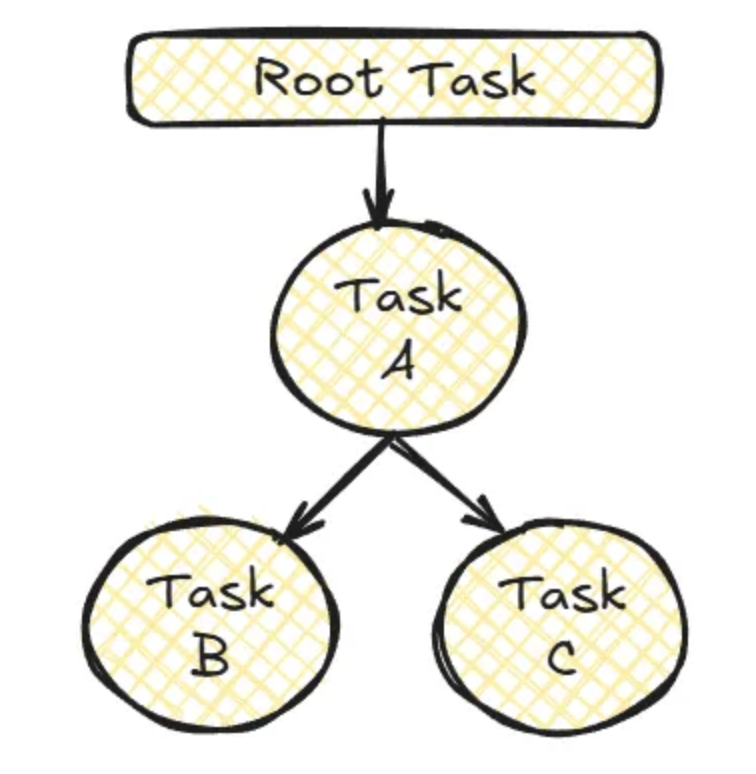
- Structured Dependencies — Hierarchical organization of tasks forming complete workflows (DAGs)
- Native Transactional Context — Integrated execution with full access to Snowflake data and metadata
- Automatic Scalability — Leveraging Snowflake's elastic infrastructure
- Centralized Management — Monitoring, suspension, and resumption from the same interface
The Anatomy of a Task
Basic syntax:
CREATE [OR REPLACE] TASK [IF NOT EXISTS] task_name
    WAREHOUSE = warehouse_name
    SCHEDULE = 'cron_expression | interval'
    [AFTER = parent_task_name]
    [WHEN boolean_expression]
    [USER_TASK_MANAGED_INITIAL_WAREHOUSE_SIZE = XS|S|M|L|XL|...]
    [SUSPEND_TASK_AFTER_NUM_FAILURES = N]
    [ERROR_INTEGRATION = integration_name]
    [COMMENT = 'comment']
AS
    sql_statement | CALL stored_procedure();
Essential Components
- Task Name — Unique identifier
- Warehouse — Compute engine that executes the task
- Schedule — When and how frequently it runs
- SQL or Stored Procedure — The actual work to perform
Advanced Components
- Dependencies (AFTER) — Relationships between tasks for sequential flows
- Conditions (WHEN) — Conditional execution based on boolean expressions
- Error Handling — Failure and notification configurations
- Comments — Documentation for maintainability
Types of Operations You Can Automate
1. Stored Procedures
Encapsulate complex logic, error handling, and multiple operations in a single unit.
CREATE TASK daily_data_processing
    WAREHOUSE = compute_wh
    SCHEDULE = 'USING CRON 0 7 * * * America/Los_Angeles'
AS
    CALL process_daily_sales_data();
2. Direct SQL Queries
Ideal for incremental updates and periodic aggregations:
CREATE TASK refresh_marketing_dashboard
    WAREHOUSE = analysis_wh
    SCHEDULE = '60 MINUTE'
AS
    INSERT INTO marketing_kpi_summary
    SELECT date_trunc('hour', event_time) as hour, campaign_id,
           count(*) as impression_count, sum(conversion_value) as total_conversions
    FROM raw_marketing_events
    WHERE event_time > dateadd('hour', -1, current_timestamp())
    GROUP BY 1, 2;
3. Compound SQL Blocks (BEGIN-END)
Multi-step logic without a separate stored procedure:
CREATE TASK complex_data_processing
    WAREHOUSE = transform_wh
    SCHEDULE = 'USING CRON 0 2 * * *'
AS
BEGIN
    CREATE TEMPORARY TABLE IF NOT EXISTS tmp_processing AS SELECT 1;
    TRUNCATE TABLE tmp_processing;
    INSERT INTO tmp_processing SELECT * FROM source_data WHERE process_date = CURRENT_DATE();
    UPDATE tmp_processing SET status = 'PROCESSED' WHERE status = 'PENDING';
    INSERT INTO final_destination SELECT * FROM tmp_processing WHERE status = 'PROCESSED';
END;
4. Integration with Snowpipe Streaming
Tasks alongside Snowpipe Streaming for near real-time processing:
CREATE TASK process_streaming_events
    WAREHOUSE = streaming_wh
    SCHEDULE = '5 MINUTE'
AS
BEGIN
    INSERT INTO processed_events
    SELECT event_id, parse_json(payload):user_id as user_id, parse_json(payload):action as action,
           CURRENT_TIMESTAMP() as processed_at
    FROM raw_events_stream WHERE processed = FALSE;
    UPDATE raw_events_stream SET processed = TRUE WHERE processed = FALSE;
END;
Data Architectures: Implementation Patterns
Pattern 1: Scheduled ETL/ELT Processing
Typical dependency tree:
└── Extract_Data (scheduled daily at 2 AM)
    ├── Transform_Stage_1 (applies initial transformations)
    │   ├── Transform_Stage_2a (processes dimensions)
    │   └── Transform_Stage_2b (processes facts)
    │       └── Load_To_Data_Mart (loads final results)
    └── Generate_Data_Quality_Report (runs validations)
Advantages: Fully automated execution, clear dependencies ensuring correct order, failure isolation in specific stages.
Pattern 2: High-Frequency Incremental Updates
Root task every 5 minutes with dependent tasks:
CREATE OR REPLACE TASK root_incremental_task
    WAREHOUSE = micro_wh
    SCHEDULE = '5 MINUTE'
AS SELECT 1;

CREATE OR REPLACE TASK process_incremental_data
    WAREHOUSE = compute_wh
    AFTER root_incremental_task
AS
    MERGE INTO target_table t
    USING (SELECT * FROM source_table
           WHERE last_modified > (SELECT MAX(last_processed_time) FROM processing_metadata)) s
    ON t.id = s.id
    WHEN MATCHED THEN UPDATE SET ...
    WHEN NOT MATCHED THEN INSERT ...;
Pattern 3: Stage-Based Processing with Snowpipe
Snowpipe → Raw Table → SnowTask (hourly) → Processed Tables → SnowTask (daily) → Data Marts. Real-time ingestion plus efficient scheduled processing.
Managing and Governing Tasks
Permission model:
- Task Creation —
CREATE TASKon schema,USAGEon warehouse - Task Operation —
OWNERSHIPorOPERATEto suspend/resume;MONITORfor execution history - Recommended roles — task_admin (create/manage), task_operator (suspend/resume), task_monitor (view-only)
Cost Considerations and Optimization
Credits are billed by warehouse size and execution time; each warehouse startup has a minimum cost (typically 1 minute). Strategies: Right-sizing warehouses, task consolidation, multi-clustering for parallel tasks.
Snowflake Tasks vs. External Orchestrators
Advantages of Tasks: Simplicity, native integration, lower latency, unified security, no external infrastructure cost.
Limitations: Minimum frequency 1 minute; closed ecosystem (Snowflake only); less sophisticated monitoring and error handling than tools like Airflow or Mage; less flexible for very complex workflows.
Case Studies
- Retail — Real-Time Inventory: Snowpipe Streaming + Tasks every 5 minutes to aggregate sales/inventory, calculate metrics, and alert low stock. Results: 5–10 min latency, 30% fewer out-of-stock situations, 75% less manual intervention.
- Financial Services — Report Consolidation: Hierarchical Tasks (extract → validate → consolidate → distribute). Results: report generation from 24 hours to 3 hours, full traceability, on-demand historical regeneration.
Conclusion
Snowflake Tasks are a fundamental tool for any data professional working with Snowflake. Their ability to automate operations, keep data updated, and orchestrate complex workflows makes them essential components of modern data architectures.
The true value isn't just in creating individual tasks, but in designing cohesive architectures that maximize their capabilities while properly managing their limitations.
Need help designing or automating your Snowflake pipelines? Contact us at team@simov.io.